
Show 20 posts from this thread on one page
|
Pages (2): [1] 2 » Show 20 posts from this thread on one page |
VisorCentral.com (http://discussion.visorcentral.com/vcforum/index.php)
- Accessories (http://discussion.visorcentral.com/vcforum/forumdisplay.php?forumid=3)
-- Stowaway Keyboard (http://discussion.visorcentral.com/vcforum/showthread.php?threadid=7961)

I'm on the verge of going out this weekend and purchasing a Stowaway Keyboard. I've found that I really would use the Visor for even more things if there was a faster way to input text information. Anyone who owns one really recommend it?
Also, what (if any) are good word processing programs? Just looking for something superior to the Memo Pad for storing all of my random files of information. Any good spreadsheet programs along the same lines?
Thanks!
...Jim
__________________
...Jim

For a Spreadsheet, Quicksheet 5.0. You can download a trial version. I played with the trail version and was quite impressed. Didn't buy it since I do not have a need for a spreadsheet. If I did, this would be the one I would select.
They also produce Smartdoc. Also search the discussion area concerning doc editors. A lot of Visor owners have used different ones.
Also check out VisorCentral reviews for these two products.
I agree about QuickSheet, and I would definitely recommend the Stowaway. It is awesome! I use it all the time. The only drawback I have found is that I know it's going to draw too much attention sometimes if I break it out in a meeting or whatever. It definitely has a Wow effect...
For word processing, get peditPro, hands down the best text editor for the Palm.
By the way, what do you mean "on the verge"? Just get the Stowaway, knowing you made the right choice. I've had it for three months, and it still blows me away (not to mention bystanders).
quote:
Originally posted by Gameboy70
For word processing, get peditPro, hands down the best text editor for the Palm.
By the way, what do you mean "on the verge"? Just get the Stowaway, knowing you made the right choice. I've had it for three months, and it still blows me away (not to mention bystanders).

__________________
We All Believe in Something. . .
<a href="http://www.beliefnet.com" target=_top><img src="http://www.beliefnet.com/imgs/beliefnet_logo_button.gif" border=0 align="absmiddle" width="75" height="16"></a>

There are at least three things you should know about the Stowaway before you buy:
quote:
Originally posted by yucca The keyboard is flat as a board. There is no ergonomic slope to the layout of the keys (i.e. higher in the upper rows and descending alittle with each row of keys). This is an area where the GoType is superior.
quote:
The keyboard does not have a numeric keypad. I mention this because you want want to use spreadsheet software. This is another advantage of the GoType.
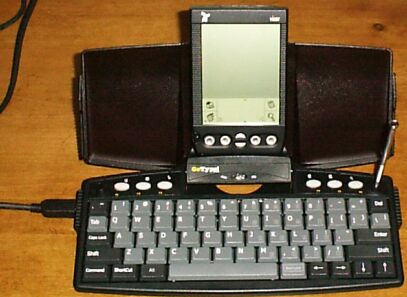
quote:
Your Visor will run slower when the keyboard driver is enabled. The performance hit can be very annoying if you bounce around between applications, especially those that are slow loading to begin with (like many DOC editors). Also, the keyboard driver automatically activates itself whenever you reset.
I got a Stowaway in July for school (High School). Unfortunately, I've yet to use it for any class. I don't want to bother taking notes on it if its just a small amount. By the time I think, "oh, I should have used my Stowaway", it's too late. Maybe I don't have very note-heavy classes (such as World History that I took last year, where this would have been a divine gift)--but I haven't used it yet and I'm on my fourth week. Maybe this could be handy for typing documents and reports during Study Hall (I have one of those both the next two trimesters after this trimester--so I'll keep you guys updated).
Just keep in mind that sometimes it's impractical, in a High School enviroment to use it and that after you get over the wow factor, pen and paper for quick things is easier (Hmm. That's the anti-PDA ).
Also, if you pulled it out it would be hard to get people to shutup about it. It's nice and all--but it slows down class and teachers get upset eventually from what I've seen from my friend sometimes. Eventually they do get used to it though. I just hope I didn't waste my money, I was hoping I could have found it more usefull by now 
__________________
-Vincent
I notice a performance hit
I recently got a stowaway for my birthday (well after they went retail). It is very plain to see that when the keyboard is enabled, after hitting the power button, I may need to wait a couple of seconds for my Visor to shut off.
That said, I still think that the stowaway is incredebly useful. While I can enter text by grafiti at up to 25-30wpm, I can type on the stowaway at 50+wpm. The increased data entry rate is so great that I often find myself annoyed with grafiti (which I never did before owning the stowaway).
-Mike
I am in a routine of pulling out the Stowaway/Visor at the beginning of class and having it available -- so if there are notes to be taken, I take them on the Stowaway. -- I started a routine that goes something like this:
Start new doc per chapter
1. Place bookmarks in doc based on chapter headers/important sections (allow easy access to various sections)
2. take notes in class under various bookmark sections
3. Tables/graphs/etc are kept on paper in a folder (referenced in the notes (ie, "See Page 3, Diag 1")
4. Lecture notes are augmented with notes taken from book.
This gives me quick access to all notes taken on a particular part of a chapter and makes it MUCH easier to study for exams. I will put plugs in my notes for sections that the teacher seems to be stressing or outright saying that its an important section/idea/concept (its going to be on the test, virtually guarenteed)
So far it seems to be working pretty good -- compared to handwriting notes, I feel I am able to take more notes, better notes and I feel that I am more involved/on top of the lecture (compared to feeling like I am playing catchup/trying to condense notes on the fly/etc..etc..) --
RE: numeric keypad -- I agree with yucca -- the stowaway NEEDS this -- Its not dedicated keys (like your desktop computer) but similar to a laptop PC where a set of keys (usually UIO/JKL/M,.) act as the numeric keypad when a modifer key is pressed (ie num lock, possibly a function-N combo on the stowaway) -- this should be fesible to impliment in software. (I'd also really like to see a Dvorak keyboard map but I don't forsee this happening any time soon..)
Joe
I recently bought a Stowaway and i'm a little worried about that ribbon that's shown when you fold the keyboard in half
Will it get worn after a ton of folding/unfolding?
other than that - the stowaway is definitely a necessity being in school
Cerulean, what app do you use? it sounds like Pedit (which i also use)
Got it!
Thanks for the great advice all, I did end up going and buying a Stowaway this Sunday.
I had opportunity to use it a little bit and I input my next travel itinerary into the Visor, practically word for word in about 10 - 15 minutes. I shudder to think how long that would've taken me in Graffiti with capital letters and special symbols.
I did check out the GoType, but the big win here is size and portability. I have a RhinoPak 3000 and the Visor and Stowaway fit perfect side by side. I do wish they had designed a stiffening bar or something to stiffen the Stowaway up a bit, but I'll deal. Also, the flat surface is a bit odd to type on, but I'm not writing book, just memos and docs where faster input would be useful.
Now to check out some of the recommendations for word processing software.
I didn't notice any significant slowdown or performance issues with the Stowaway thus far, but I'll keep my eye out for it...
Thanks again!!
...Jim
__________________
...Jim

Originally posted by Gameboy70
quote:
. . . I didn't remember the GoType having a numeric keypad . . .
for spreadshets, after trying a number of them, I've been using MiniCalc ever since last December - and am very happy with it.
- The biggst selling point, from my point of view, was the Excel interface and how easy it is to get spreadsheets to the Visor.
- When you install MinicCalc it adds a menu choice to the main menu. So you can create or edit a sheet on the PC, and simply select the MiniCalc menu choice to send it to the Palm desktop where it waits for the next sync. So far, most of the formatting comes across really well.
- I tested 4-5 other SS programs, but they all involved cutting & pasting or some sort of file conversion process. With MiniCalc, I just click, then sync!
- My typical use is to summarize a larger spreadsheet on my PC - perhaps an inventory management/usage or run rate report - onto a new, small sheet on the PC, then load it to my Visor to have the figures available for meetings, etc.
quote:
Originally posted by yucca
There is a rather prominent NumLock key just to the right of the space bar. After toggling NumLock, the 7,8 and 9 keys are still 7,8 and 9; the zero key is "*"; u,i,o and p are 4,5,6 and "-"; j,k,l and ";" are 1,2,3 and "+"; and m becomes zero.
There are a few Word Proccessing programs that are prety good LandWare's TakeNote! is what I use, but QED with QEX, is great but spartin. The best one isn't on the market yet (but I have a copy) called MEGAdoc, it is very buggy and when it gets better you'll hear alot about it. MegaDoc edits PalmDOC, WordDoc, HTML, RTF, TXT and a cupple of others, it is real great but when the bughs get worked out it'll be even beter.
__________________
Sam Kleinman
PocketPCThoughts.com
CollectiveArts
Free-ePress
Musings of a Teal Artist
CollectiveArts TechMusings
"Everybody don't like something and we all don't like you." -- Richard Thompson, Hard Luck Stories
quote:
Originally posted by Celchu19
There are a few Word Proccessing programs that are prety good LandWare's TakeNote! is what I use, but QED with QEX, is great but spartin. The best one isn't on the market yet (but I have a copy) called MEGAdoc, it is very buggy and when it gets better you'll hear alot about it. MegaDoc edits PalmDOC, WordDoc, HTML, RTF, TXT and a cupple of others, it is real great but when the bughs get worked out it'll be even beter.
I must tell you before hand that you realy don't want it, there are so many bugs, watch out for it on palm gear (it was there for 2 days before I and some others (i assume) complainded about a in consisity in the distrubution licence)
But if you realy want it, backup your visor realy good and contact me and I'll send it to you
__________________
Sam Kleinman
PocketPCThoughts.com
CollectiveArts
Free-ePress
Musings of a Teal Artist
CollectiveArts TechMusings
"Everybody don't like something and we all don't like you." -- Richard Thompson, Hard Luck Stories
 Megadoc...
I have Megadoc too, I like it alot, it has only crashed once on me.
I got it right before they took it down.

?
One thing I don't see anyone bringing up that was big in my decision was the serial port I/O monopoly. If you get the GoType! it stays hotsync'd and you can't use the modem at the same time. With the Targus Stowaway, you can, from what I've heard. I could be wrong and I hope I am because it would save me some $$$, so jump in at anytime people. Here is the post I created...
http://discussion.visorcentral.com/...p?threadid=8083
I will most likely be using my Visor+Keyboard+Modem for a month before I get to a PC again so the simultanious usage of the modem and keyboard is very important as it's going to be my PC replacement. I also have investigated a little further with the artcle that was linked to this one about the feature article of Targus Stowaway vs. Gotype! and saw there is a cable for the Stowaway for hotsync'ing so wouldn't that also prevent the usage of the keyboard at the same time as the modem or other springboard module? I believe this to be a commonly overlooked/unknown aspect when discussing the Visor. It would REALLY be cool to eliminate this Serial/Springboard I/O conflict in the Platinum version. This brings other questions to my brain like a keyboard and the Cellular module, but I'm not enough of an expert on this to investigate. Anyway this is getting long and boring, I just wanted to attempt to offer another helpful perspective in the keyboard battle 
I just want to apologize in advance if anything I said was inaccurate... don't use my post as a bottom line for decision making!
| All times are GMT. The time now is 09:32 PM. | Pages (2): [1] 2 » Show 20 posts from this thread on one page |
Powered by: vBulletin Version 2.3.4
Copyright © Jelsoft Enterprises Limited 2000 - 2016.